How to Transfer GCash to USDT and Send It Out: Wallets, Casinos and Friends
Welcome bonus for new players + fast crypto payouts. Just helping a brother out.
18+/21+. Crypto only. Ad: we may earn a commission. Play responsibly. October 2026
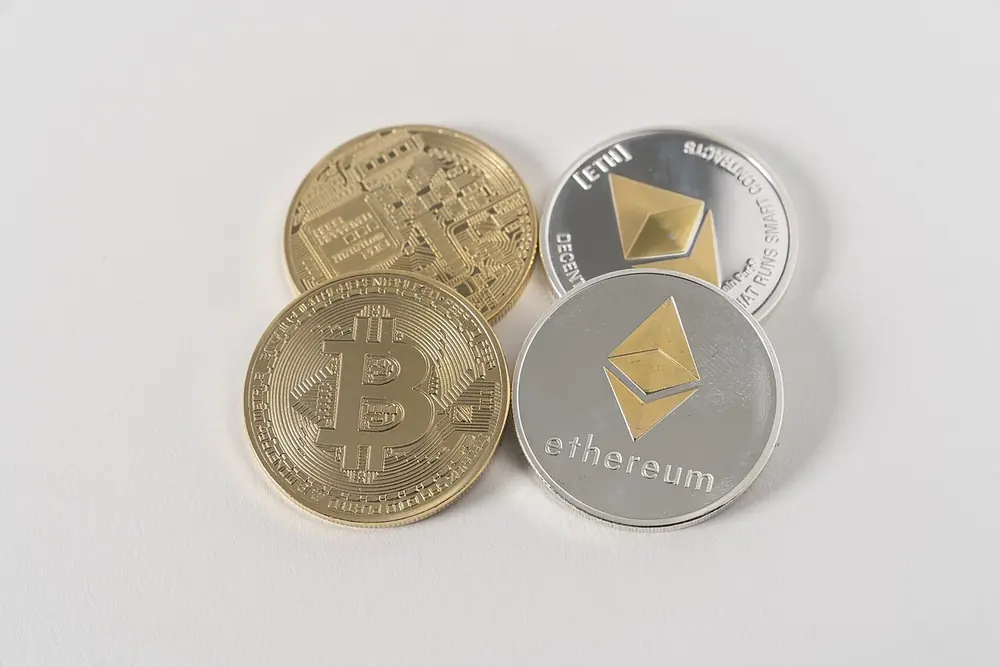
"Transfer GCash to USDT" usually means two things in one: turning pesos into USDT, then moving that USDT somewhere else, a self-custody wallet, a crypto sportsbook, or a friend. The first part is a single tap. The second part is where people make expensive mistakes.
We cover buying briefly and spend most of this guide on the transfer itself. For a route-by-route comparison of buying, see how to convert GCash to USDT; for casino-specific deposits, see our GCash crypto casino deposit guide.
18+/21+. Crypto only. Ad: we may earn a commission. Play responsibly. October 2026
Part 1 in brief: pesos to USDT
In GCash, open GCrypto, choose USDT, tap Buy, enter a peso amount and confirm. You need a fully verified GCash account. GCrypto runs on PDAX, a BSP-licensed exchange, and the price includes a spread. The USDT appears in your GCrypto balance, ready to send. Our Tagalog paano bumili ng USDT sa GCash page has the detailed walkthrough.
Part 2: the send flow
- Get the receiving address and network from the destination (wallet, casino or person).
- In GCrypto, select USDT and tap Send.
- Choose the network that matches the destination exactly.
- Paste the address. Add the destination tag or memo if the destination requires one.
- Enter the amount and review the send fee, which includes the network fee.
- Confirm with the email OTP sent by PDAX.
- Copy the transaction ID once it's sent.
Crypto sends are irreversible. Neither GCash nor anyone else can pull back USDT that went to the wrong address.
Address formats: a quick sanity check
Each network has a recognisable address style. Checking the format catches many mistakes before they happen:
| Network | Address looks like |
|---|---|
| TRC20 (Tron) | Starts with "T", 34 characters |
| ERC20 (Ethereum) | Starts with "0x", 42 characters |
| Avalanche C-Chain | Starts with "0x" (same style as Ethereum) |
| TON | Usually starts with "EQ" or "UQ" |
Watch out: Ethereum-style addresses look identical across several networks. A "0x" address alone doesn't tell you whether the destination expects ERC20 or another EVM network. Always confirm the network name, not just the address style. GCash lists USDT on ERC20, TRC20, Avalanche, Celo, Kaia and TON; our network guide explains each.
Destination 1: your own self-custody wallet
Moving USDT to a wallet where you hold the keys gives you full control, and full responsibility.
- Make sure the wallet supports USDT on the network you'll send. Many wallets need you to enable the token or network first.
- For TRC20 USDT, a Tron wallet may need a little TRX to send the USDT onward later, since Tron network fees are paid in TRX or energy. Receiving doesn't require TRX.
- For ERC20, onward sends need ETH for gas.
- Back up the seed phrase offline before sending anything meaningful.
Destination 2: a crypto casino or sportsbook
- Generate a fresh deposit address in the casino's cashier for USDT and note the network it shows.
- Check the casino's minimum deposit for that network. Deposits below the minimum may not be credited.
- Some casinos use separate addresses per network under the same coin. Pick the right tab.
- Expect the deposit to credit after the network's required confirmations.
Cloudbet accepts USDT on several networks. It's licensed in Curaçao, not by PAGCOR, so there's no Philippine regulator for disputes. GCash no longer shows in-app links to gambling sites after a BSP order in August 2025, so you'll be copying the address from the casino yourself. Gambling is for adults 21 and over; PAGCOR bars students and government employees.
Destination 3: another person
Sending USDT to family, a friend or someone you're paying is common. A few rules:
- Ask them to send the address and network in writing, ideally by copying from their app's Receive screen.
- If they also use GCrypto, they can share their GCrypto USDT address; it still goes over the blockchain like any other send.
- For a first transfer, send a small test and have them confirm receipt.
- Never send USDT to someone you met online who promises to "double" it or pay you back with interest.
Choosing a network for each destination
A practical way to decide, after confirming what the destination supports:
- Casino deposit: TRC20 if offered, because fees are low and confirmations quick. Some casinos also take cheaper EVM networks; check their list against GCrypto's.
- Your own wallet: pick the network your wallet is set up for and where you'll use the USDT later. If you plan to swap on Ethereum apps, ERC20 avoids an extra bridge step despite the higher fee.
- Family abroad: use whatever their local exchange accepts with the lowest fee; ask them to check their deposit screen.
- Another GCrypto user: TRC20 is the usual choice since both sides support it.
Sending to family abroad or receiving from OFWs
USDT is popular for cross-border transfers because it moves in minutes. Two points specific to that use: the recipient will pay their own local cash-out costs, so compare the total against a regular remittance service before assuming crypto is cheaper; and if you're receiving USDT from abroad into GCrypto, large amounts may prompt questions about the source. A short note from the sender explaining the purpose, kept with the transaction ID, makes those conversations easy.
How long does a transfer take?
Most GCrypto sends on TRC20 arrive within minutes. ERC20 depends on Ethereum congestion. Add the receiving platform's own crediting time, and a possible GCrypto security review. If you need funds somewhere by a deadline, send at least a couple of hours early.
18+/21+. Crypto only. Ad: we may earn a commission. Play responsibly. October 2026
Fees: what you'll pay
GCrypto charges a send fee that varies by coin and network and already includes the network fee. Receiving is free. Your total cost for a transfer is therefore the buy spread plus the send fee. Rough illustration, not a quote: buying ₱5,000 of USDT with a 1.5% spread costs about ₱75; a send fee around 1 USDT adds about ₱58 at ₱58 per USDT. That's roughly ₱133, or 2.7% of ₱5,000. On ₱1,000 the send fee alone would be nearly 6%, which is why tiny repeated transfers are wasteful. Our cheapest way to send crypto guide compares options.
Limits and the ₱50,000 check
GCrypto's daily send limit is ₱1,000,000 per 24 hours. For sends of ₱50,000 or more, you may be asked for recipient details, in line with the anti-money laundering "travel rule" that applies to regulated virtual asset providers. Answer accurately. Some sends also go through a security review, which GCash says typically takes 60 to 120 minutes, with possible extra waiting if the network is congested.
If the transfer doesn't arrive
- Check GCrypto's transaction status: completed, pending, or under review.
- If completed, search the transaction ID on the network explorer (Tronscan for TRC20, Etherscan for ERC20).
- If the explorer shows it confirmed to the right address, contact the receiving platform with the ID. GCash's help pages also advise contacting the receiving wallet first.
- If it's stuck in review beyond the stated window, contact GCash through the in-app Help Center.
Our GCash crypto not working guide has more scenarios.
Five ways people lose USDT
- Wrong network. Sending TRC20 USDT to an address that only accepts another network.
- Missing memo. Some exchange deposit addresses are shared and need a tag to identify you.
- Clipboard malware. Malicious apps replace the copied address with the attacker's. Always verify the first and last characters after pasting.
- Address poisoning. Scammers send tiny amounts from lookalike addresses so they appear in your history; copying from history can send funds to them. Copy from the recipient's Receive screen instead.
- Fake recipients. "Support agents" or "investment managers" asking you to transfer USDT to "verify" or "unlock" something.
Whitelists and saved addresses
After a successful test, save regularly used addresses where your apps allow it, and label them clearly ("Cloudbet TRC20", "Ate's wallet"). On exchanges and casinos, turn on withdrawal whitelists so only approved addresses can receive funds from your account. It slows down attackers more than it slows you down.
Why not just use P2P?
Some guides suggest skipping GCrypto and buying USDT through P2P on international exchanges, paying strangers via GCash, then transferring from there. Besides the SEC flagging platforms like OKX and MEXC as unregistered in August 2025, the peso payment goes to a stranger's account, and if their funds are linked to fraud, your GCash can be restricted. For a transfer you could do entirely inside a licensed app, that extra risk rarely makes sense. If the destination is a wallet or casino anyway, GCrypto can send there directly.
Keep a transfer log
For each transfer, note the date, amount, network, destination label, fee and transaction ID. It takes seconds and turns any support ticket into a quick fix.
Taglish summary
Bili muna ng USDT sa GCrypto, tapos Send. Ang pinakamahalaga: parehong network sa magkabilang dulo, tamang address, at memo kung kailangan. Mag-test muna ng maliit sa bagong address. Kapag ₱50,000 pataas, asahan na hihingan ka ng detalye ng recipient. At tandaan, walang bawian sa crypto, kaya dahan-dahan bago mag-confirm.
Pre-send checklist
- Coin is USDT, not another stablecoin.
- Network matches the destination's network name.
- Address pasted from the destination's Receive or Deposit screen, and first and last characters verified.
- Memo or tag added if required.
- Amount is above the destination's minimum.
- Small test done for a new address.
- Transaction ID saved.
Mga Madalas Itanong (FAQ)
Pwede bang mag-send ng USDT mula GCash papunta sa ibang wallet?
Yes. Use Send in GCrypto, choose a supported network that matches the destination, paste the address and confirm with the email OTP.
Magkano ang fee sa pag-send ng USDT sa GCash?
It varies by network and includes the network fee. Receiving is free.
Kailangan ba ng TRX para mag-send ng TRC20 USDT mula GCrypto?
No, GCrypto charges its send fee directly. A self-custody Tron wallet may need TRX to send onward later.
Ano ang mangyayari kung mali ang network?
Funds may be lost permanently. Contact support right away, but recovery isn't guaranteed.
PAGCOR-licensed ba ang Cloudbet?
No, Cloudbet is licensed in Curaçao.
18+/21+. Crypto only. Ad: we may earn a commission. Play responsibly. October 2026
18+/21+. Crypto only. Ad: we may earn a commission. Play responsibly. October 2026
If gambling stops being fun, call PAGCOR's free 24/7 National Problem Gambling Helpline at (02) 8248-9568 (+63 2 8248 9568), or visit npgh.ph. Source: PAGCOR Responsible Gaming.